
Share this
by Radost on 8-Dec-2025
Keeping digital signage running smoothly does not stop when you leave your desk. A frozen playlist or network fault can interrupt messaging and cost valuable screen time. The Samsung VXT CMS Mobile App solves that by putting monitoring and management tools in your hand. Linked directly to the VXT CMS, it gives IT and operations teams real-time visibility for every connected display.
VXT CMS Mobile – What Is It and How Does It Work?
The VXT CMS Mobile extends the full monitoring power of the cloud platform to your smartphone or tablet. Instead of logging in through a desktop browser, operations and IT teams can check display status, receive alerts and act directly from the mobile dashboard, wherever they are. It gives decision-makers real-time visibility and control over every screen across the network.
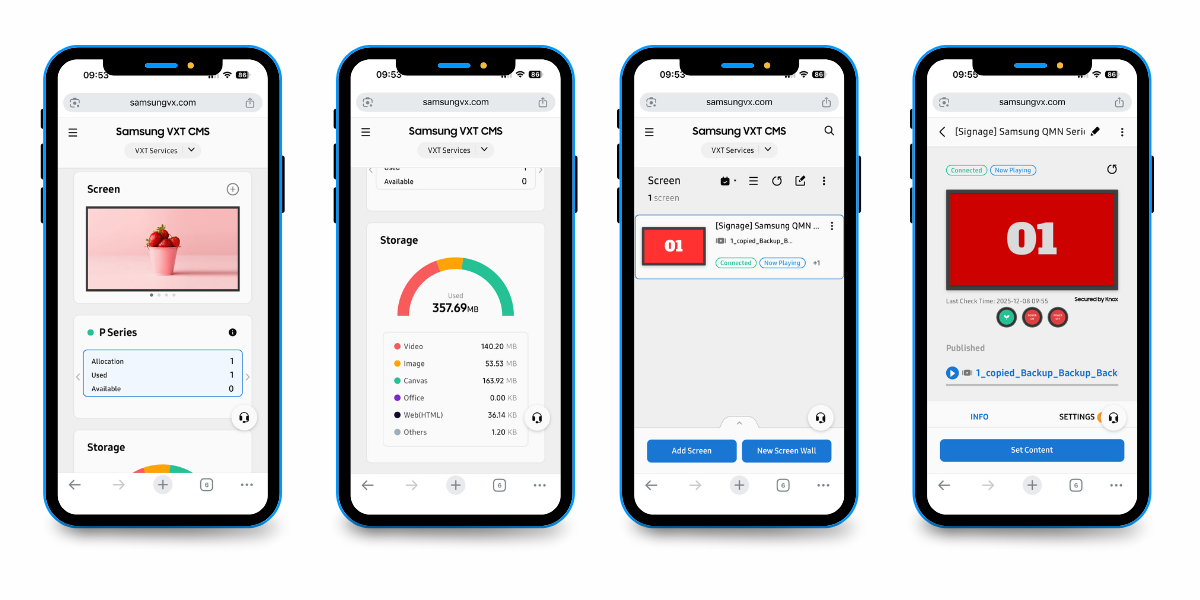
Behind the interface, VXT continuously monitors each connected display for abnormal signs such as disconnection, unstable playback, or network failure. When an issue appears, the system automatically creates an Early Warning Report, notifies authorised users, and displays suggested actions for a quick fix. Here is an example of how the mobile workflow operates:
- Instant alert – A push notification appears the moment VXT detects an issue (for example, a screen offline or incorrect content).
- Quick insight – Open the alert to view full details: location, device name, last update time, and playback status.
- Remote action – From the same screen, carry out supported actions such as refreshing content or restarting the display to restore normal operation.
- Automatic confirmation – Once normal operation resumes, the alert clears and the event may be recorded in the system for review.
Together, the Mobile App and Early Warning Reports transform signage management from reactive to proactive. Instead of discovering faults after they affect audiences, your team is alerted the moment risk appears. With those, you can reduce downtime, maintenance cost and operational stress.
Why Samsung Introduced VXT CMS Mobile & Early Warning Reports
As digital-signage networks grow, managing hundreds of screens across different sites becomes harder. Small faults, like a frozen video, a disconnected player, a network drop, can go unnoticed until customers or staff report them. Samsung introduced the VXT CMS Mobile App and Early Warning Reports to remove that blind spot and give teams real-time visibility wherever they are.
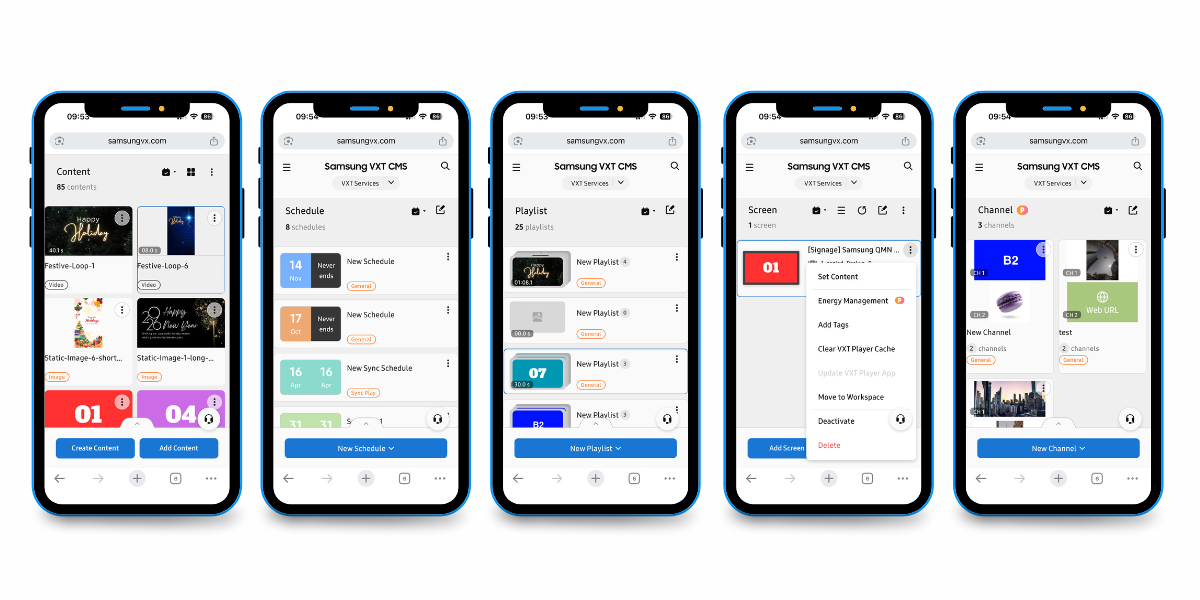
The goal is simple: detect issues early, act faster and prevent downtime. These two functions extend the VXT CMS beyond the desktop, letting administrators receive instant alerts, review device status and resolve problems remotely. According to Samsung, VXT’s monitoring engine “tracks display health in real time and issues an early warning when abnormal conditions are detected”.
Samsung designed VXT CMS Mobile App and Early Warning Reports to close visibility gaps in large digital-signage operations. Here is how this mobile-first approach resolves the most common management challenges:
|
Common challenges and how the feature helps |
||
|
Challenge |
Traditional Approach |
With the feature |
|
Delayed fault detection |
Problems discovered manually or after audience impact |
Real-time alerts notify users instantly on mobile |
|
Limited off-site control |
Issues handled only from desktop CMS |
Full monitoring and response from smartphones or tablets |
|
Long recovery times |
On-site intervention required before repair |
Remote actions shorten downtime and reduce service calls |
|
High operational costs |
Repeated technician visits and manual checks |
Early alerts cut travel and maintenance overhead |
|
Inconsistent visibility across regions |
Each site managed separately |
Unified dashboard keeps all locations under live supervision |
Together, these improvements align with Samsung’s wider push for proactive, cloud-driven signage management. By alerting users before faults escalate, the platform strengthens uptime, improves content reliability and gives organisations tighter control over large or distributed display networks, without adding complexity.
Best Practices for Effective Mobile Monitoring
Available alerts may vary depending on your VXT licence and display model, but these habits help any team stay proactive. Getting the most from the VXT CMS Mobile App and Early Warning Reports comes down to consistent routines and clear alert settings. These best practices help digital-signage teams stay proactive, avoid missed notifications and keep every display performing reliably.
- Assign Clear Alert Priorities
- Apply Role-Based Access
- Combine Mobile and Desktop Reviews
- Test and Calibrate Alert Accuracy
- Log and Review Every Response
- Maintain Strong Connectivity
1. Assign Clear Alert Priorities
Decide which conditions should trigger mobile notifications. For example, offline screens, rising temperatures, or playback errors. Setting alert priorities keeps focus on the most critical events and reduces noise from minor updates.
2. Apply Role-Based Access
Give maintenance alerts only to authorised team members, such as IT engineers or operations managers. Targeted access ensures messages reach the right people instantly and avoids confusion when several departments share the same network.
3. Combine Mobile and Desktop Reviews
Use the mobile app for live alerts and the main VXT CMS dashboard for scheduled checks. This dual approach gives a full picture of screen health and confirms that every workspace, tag and schedule is up to date.
4. Test and Calibrate Alert Accuracy
Run brief simulations (e.g. disconnect a test screen or trigger a dummy warning) to confirm notifications appear promptly on mobile devices. Regular tests validate system reliability and highlight any configuration gaps before a real incident occurs.
5. Log and Review Every Response
Keep a short record of each alert, response time and resolution inside your service or audit log. Analysing this data improves workflows, strengthens compliance with SLAs, and supports future maintenance planning.
6. Maintain Strong Connectivity
Reliable network access is key to accurate monitoring. Use stable Wi-Fi or secure mobile data when viewing dashboards so status information and Early Warning Reports refresh in real time.
Implementing these steps turns mobile monitoring into a dependable extension of your signage operations to improve uptime, data accuracy and coordination across every site.
Conclusion: Proactive Control in the Palm of Your Hand
These functionalities bring genuine mobility to digital-signage management. By extending the VXT CMS to smartphones and tablets, they give operations and IT teams instant awareness of every screen’s status and the ability to respond the moment something goes wrong.
Instead of waiting to discover offline displays or playback errors, users receive real-time alerts that guide faster, data-driven action. This proactive approach reduces downtime, lowers maintenance costs, and keeps scheduled content running as planned.
Ready to bring real-time visibility to your signage network? Contact the VXT Services team to learn how the Samsung VXT CMS Mobile App can help you monitor, manage and maintain your displays anywhere.
Frequently Asked Questions About the Samsung VXT CMS Mobile App and Early Warning Reports
Q1. What can you do with the Samsung VXT CMS Mobile App?
The Samsung VXT CMS Mobile App lets you monitor and manage digital-signage screens directly from your smartphone or tablet. Connected to the VXT CMS, it delivers real-time status updates, notifications and supported remote actions. This ensures faster issue resolution, better uptime and full visibility of your display network wherever you are.
Q2. What are Early Warning Reports in Samsung VXT?
Early Warning Reports are automatic alerts generated when the system detects abnormal conditions, such as screen disconnections, playback issues or device-temperature warnings. The reports notify authorised users instantly and suggest corrective steps, helping teams prevent downtime and keep digital-signage content running smoothly across every site.
Q3. How does the VXT CMS Mobile App improve signage management efficiency?
By pairing mobile access with Early Warning Reports, the app turns reactive management into proactive monitoring. IT and operations teams can diagnose problems instantly, respond remotely and reduce site visits. This real-time insight improves network reliability, cuts maintenance costs, and keeps content on schedule across large or multi-site signage networks.
Q4. Do you need additional hardware or licences to use the VXT CMS Mobile App?
No extra hardware is required. The VXT CMS Mobile App works with compatible Samsung displays connected to the VXT platform. Available features, such as alert categories and remote-action options, depend on your display model and VXT licence type, so always confirm compatibility before setup or rollout.
Q5. Who benefits most from using the VXT CMS Mobile App and Early Warning Reports?
The feature is designed for digital-signage administrators, IT managers, and operations teams overseeing multiple displays or sites. It helps them act faster, maintain uptime, and ensure consistent on-screen content. This makes it especially valuable for retailers, transport operators, education providers and enterprise networks seeking greater operational control.
No Comments Yet
Let us know what you think